Rust 的非同步程式設計
在 Rust 中,非同步程式設計是通過 Future 資料型別與 async 與 await 關鍵字來實現的。
非同步程式設計在很多語言都有
如果你很熟 JavaScript 的話,或許這一章節的內容會讓你感到熟悉,但是 Rust 的非同步程式設計仍有其獨到之處。這一章節你會了解…
- 如何開發非同步程式。
- 執行緒與非同步的差異。
- 非同步程式的底層機制。
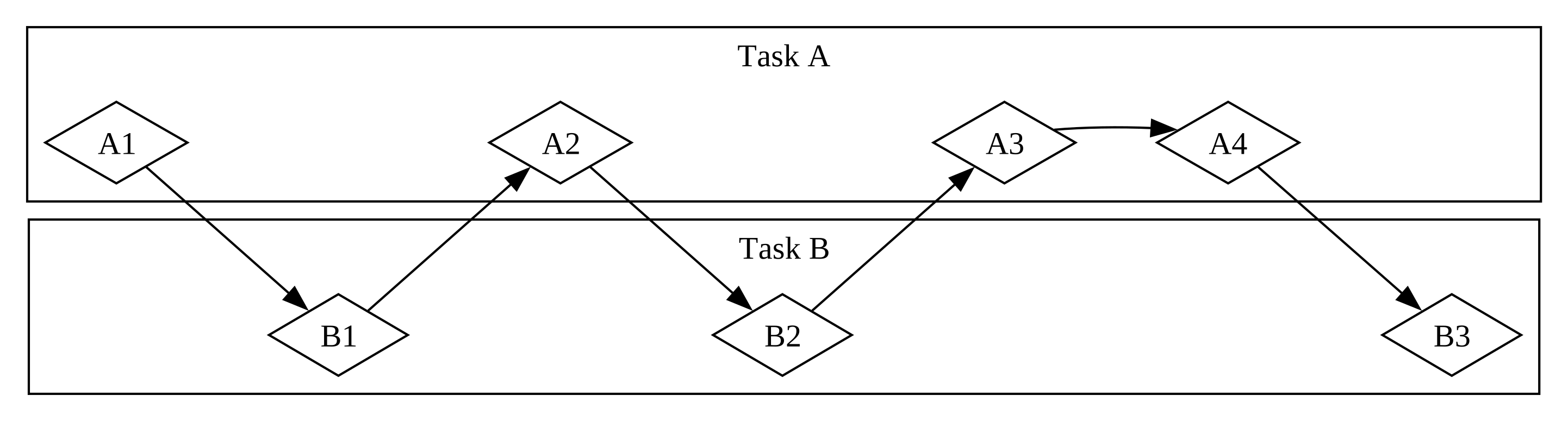
並行(Concurrency)
一個人執行多個任務,執行過程中可以在不同任務之間切換。適合處理 I/O 密集型(I/O Bound)的工作。
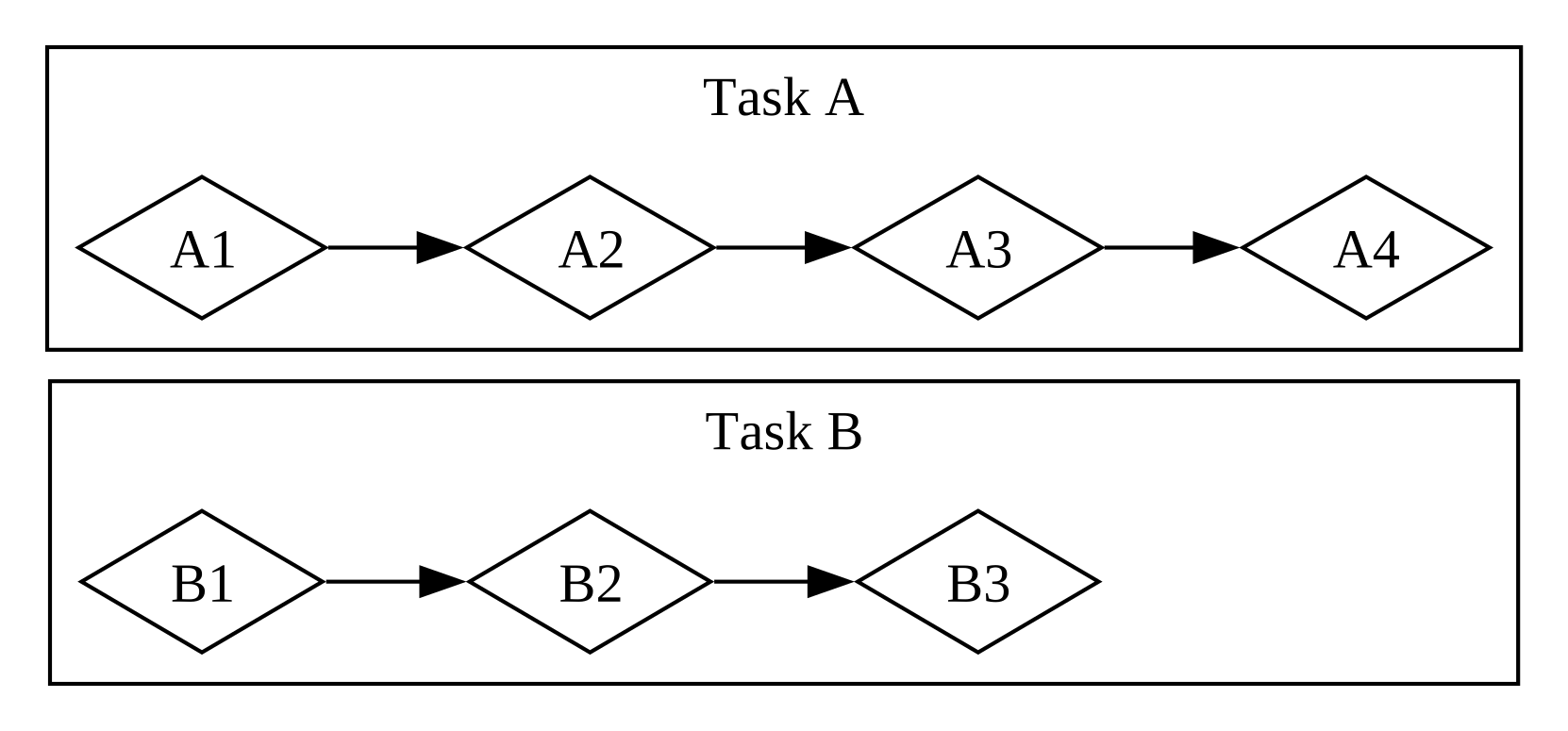
平行(Parallelism)
多個人同時執行多個任務。適合處理 CPU 密集型(CPU Bound)的工作。
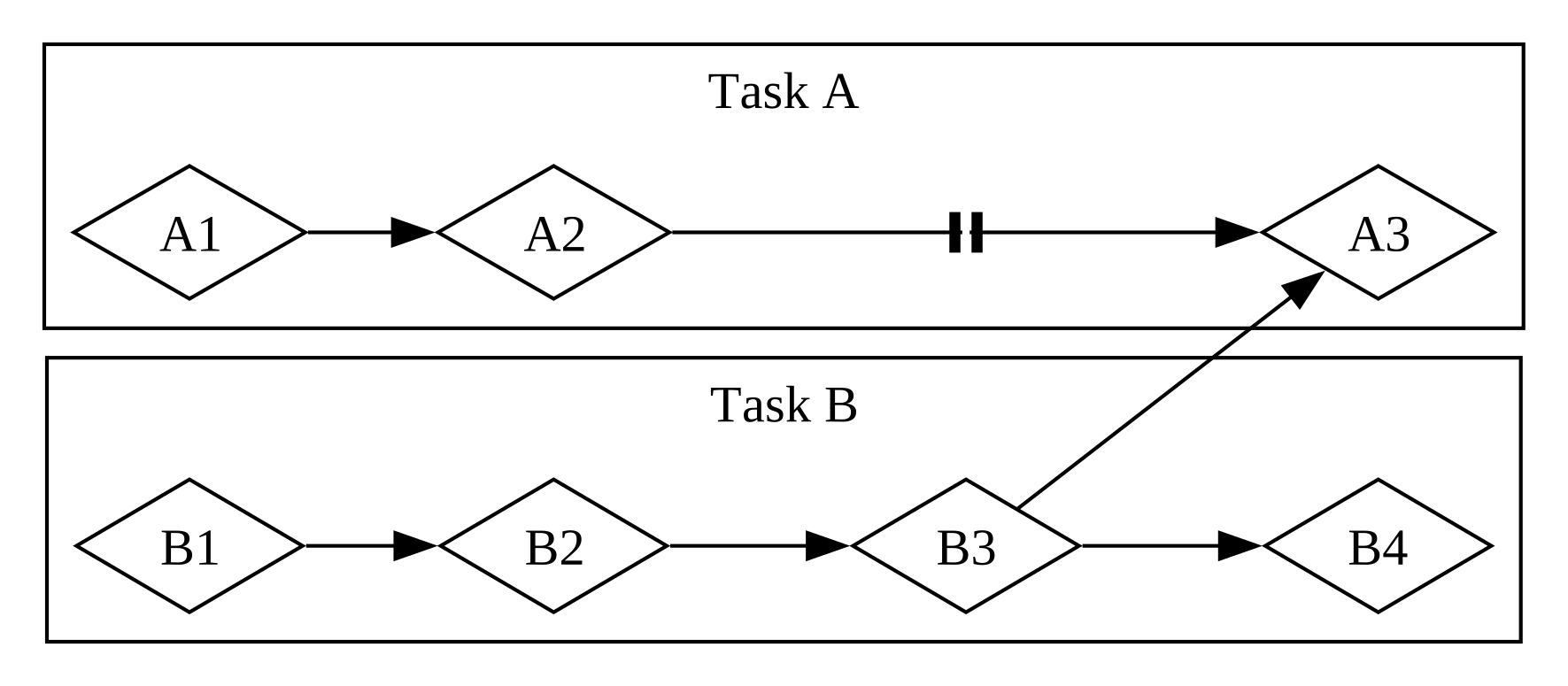
更複雜一點,部分平行(Partially Parallel)
多個任務之間有依賴關係。例如任務 A 的某個步驟需要等待任務 B 的某個步驟完成。
Rust 如何執行非同步程式
根據硬體,也就是 CPU 的核心數量與執行緒數量,Rust 在執行非同步程式碼時,有可能使用 Concurrency 或是 Parallelism 等流程。
Rust 的非同步語法
主要圍繞在 Future 資料,還有 async 與 await 關鍵字。
Future 是一種實作了 Future 特徵的資料型別。
在其他語言也有類似的資料型別,例如在 JavaScript 稱為
Promise
一個簡單的爬蟲範例
因為極簡主義,雖然 Rust 原生支援非同步程式,但是沒有提供可以執行非同步程式碼的 Runtime,所以需要一個第三方 crate,例如 trpl。
建立一個新的專案,並安裝 trpl 這個 Crate。
cargo new hello-async
cd hello-async
cargo add trpl
trpl 為 The Rust Programming Language 的簡稱。
👨💻 定義非同步函式 page_title()
定義一個非同步函式 page_title(),以頁面網址為參數,對該頁面發送 HTTP 請求並取得 <title> 元素的內容。
use trpl::Html;

// ⚠️ 宣告為 async 的函式會返回實作 Future 特徵的資料型別,但在 return type 上不用標注
async fn page_title(url: &str) -> Option<String> {
    // 取得 HTTP 標頭與 Cookies
    // ⚠️ 如果沒有用 await,程式不會執行
    let response = trpl::get(url).await;
    // 取得 HTML Body
    let response_text = response.text().await;

    // 上述兩行程式碼可以簡寫成下面這一行
    // let response_text = trpl::get(url).await.text().await;

    // 解析 HTML 並取得標題
    Html::parse(&response_text)
        .select_first("title")
        .map(|title| title.inner_html())
}
👩💻 執行非同步函式
宣告好非同步函式後該如何去執行它?因為 Rust 本身不提供執行非同步程式的 Runtime,所以我們必須要使用 trpl::block_on()。
trpl::block_on() 可以接收一個 async 函式或區塊,它會阻塞主程式並等待這個 async 完成。
// ⚠️ main 函式作為程式的進入點,不可以加上 async 關鍵字
fn main() {
    let url = String::from("https://www.rust-lang.org");

    // 透過 block_on 阻塞主程式並等待傳入的 async 區塊完成
    trpl::block_on(async {
        // ⚠️ 因為 async 區塊會回傳 Future,所以這裡需要使用 .await 來取得結果
        match page_title(&url).await {
            Some(title) => println!("The title for {url} was {title}"),
            None => println!("{url} had no title"),
        }
    })
}
👩💻 嘗試回傳一個 async
修改剛剛的程式碼,將 page_title() 函式回傳一個 async 區塊。
use std::future::Future;
use trpl::Html;

// 將 page_title 函式修改成返回 async 區塊
// 可以看到 return type 的標注,為一個實作 Future 特徵的資料型別
async fn page_title(url: &str) -> impl Future<Output = Option<String>> {
    // move 關鍵字可以將外部變數所有權移動到區塊中,但這裡可加可不加
    async move {
        let response_text = trpl::get(url).await.text().await;

        Html::parse(&response_text)
            .select_first("title")
            .map(|title| title.inner_html())
    }
}
修改 page_title() 的回傳值之後,我們的 main() 函式也需要做些修改。
fn main() {
    let url = String::from("https://www.rust-lang.org");

    trpl::block_on(async {
        // 回傳結果為 Future 裡面又包了一個 Future
        // ⚠️ 所以這裡需要使用兩次 .await 來取得結果
        match page_title(&url).await.await {
            Some(title) => println!("The title for {url} was {title}"),
            None => println!("{url} had no title"),
        }
    })
}
📝 回顧剛剛的程式碼
- Future 是惰性(Lazy)的,如果不使用
await關鍵字,那麼程式就不會被執行。 await只能在async函式與區塊中使用。- 每一個
await出現的地方,就代表將控制權交還給 Runtime。如果有多個任務同時在執行,擁有控制權的 Runtime 會決定要執行哪一個任務。 - Rust 編譯器會將
async區塊編譯成一個隱形的狀態機(State Machine)。 - 狀態機能讓 Rust 可以追蹤非同步程式的狀態,所以任務做到一半也能跑去做其他事情,不用擔心原先任務的進度被遺忘。
- 身為一個程式的入口點
main()無法變成一個狀態機,所以不能加上async關鍵字(除非你使用 Tokio 提供的巨集)。
為什麼
main()不能加上async關鍵字?仔細想想,狀態機需要一個 Runtime 去管理,但如果執行 Runtime 的入口點
main()變成一個狀態機,那麼誰可以管理這個狀態機呢?Runtime 根本還沒執行啊!
非同步在哪裡?
你可能會疑惑,剛剛使用的方式,明明還是同步的。
// 三個任務依序執行
page_title(&url).await;
page_title(&url).await;
page_title(&url).await;
我們要如何讓兩個工作同時進行呢?這就要來介紹等等會使用到的兩個函式。
trpl::select(): 同時執行兩個 Future,並回傳最先完成的 Future。trpl::join(): 同時執行兩個 Future,當兩個 Future 都完成時,回傳一個包含兩個 Future 結果的 Future。
👨💻 看看哪個函式先回傳
示範使用 trpl::select() 取得最先回傳的結果。
use trpl::{Either, Html};

fn main() {
    let url_1 = String::from("https://www.php.net/");
    let url_2 = String::from("https://www.rust-lang.org");

    trpl::block_on(async {
        let title_fut_1 = page_title(&url_1);
        let title_fut_2 = page_title(&url_2);

        // trpl::select() 會回傳最先訪問成功的頁面,並包在 Future 中
        let (url, maybe_title) = match trpl::select(title_fut_1, title_fut_2).await {
            // Either<A, B> 為一個列舉,包含 Left(A) 與 Right(B) 兩位成員
            Either::Left(left) => left,
            Either::Right(right) => right,
        };

        println!("{url} returned first");

        match maybe_title {
            Some(title) => println!("Its page title was: '{title}'"),
            None => println!("It had no title."),
        }
    })
}

async fn page_title(url: &str) -> (&str, Option<String>) {
    let response_text = trpl::get(url).await.text().await;

    let title = Html::parse(&response_text)
        .select_first("title")
        .map(|title| title.inner_html());
    (url, title)
}
👩💻 執行緒與非同步的差異
我們也可以使用執行緒來同時執行多個任務,那麼這個做法與非同步有什麼不同?
使用 spawn_task 執行多個任務
use std::time::Duration;

fn main() {
    trpl::block_on(async {
        // spawn_task 會在 Runtime 上產生一個新的非同步任務(async task)
        // ⚠️ 但是這個任務並不會完整執行,因為執行到一半,主程式就會結束了
        trpl::spawn_task(async {
            for i in 1..10 {
                println!("hi number {i} from the first task!");
                trpl::sleep(Duration::from_millis(500)).await;
            }
        });

        // ⚠️ 主程式在這個迴圈執行完畢後立刻結束
        for i in 1..5 {
            println!("hi number {i} from the second task!");
            trpl::sleep(Duration::from_millis(500)).await;
        }
    });
}
執行結果如下,可以看到第一個任務並沒有完整執行,因為主程式在這個迴圈執行完畢後立刻結束。需要注意的是,每次執行時,打印順序都會不太一樣:
hi number 1 from the first task!
hi number 1 from the second task!
hi number 2 from the first task!
hi number 2 from the second task!
hi number 3 from the first task!
hi number 3 from the second task!
hi number 4 from the second task!
hi number 4 from the first task!
hi number 5 from the first task!
如果想要等執行緒中的任務完成,trpl::spawn_task() 會回傳一個 Future,我們可以使用 .await 來等待它完成。
use std::time::Duration;

fn main() {
    trpl::block_on(async {
        let handle = trpl::spawn_task(async {
            for i in 1..10 {
                println!("hi number {i} from the first task!");
                trpl::sleep(Duration::from_millis(500)).await;
            }
        });

        for i in 1..5 {
            println!("hi number {i} from the second task!");
            trpl::sleep(Duration::from_millis(500)).await;
        }

        // 確保第一個任務結束後才結束主程式
        handle.await.unwrap();
    });
}
使用非同步執行多個任務
使用非同步執行多個任務時,我們可以使用 trpl::join() 來等待所有 Future 完成。每次使用 .await,都代表將控制權交還給 Runtime,讓 Runtime 有機會去檢查其他 Future 是否已經準備好,並執行它們。
// ⚠️ 不另外生成一個執行緒處理任務,而是使用兩個 Future
fn main() {
    trpl::block_on(async {
        let fut1 = async {
            for i in 1..10 {
                println!("hi number {i} from the first task!");
                trpl::sleep(Duration::from_millis(500)).await;
            }
        };

        let fut2 = async {
            for i in 1..5 {
                println!("hi number {i} from the second task!");
                trpl::sleep(Duration::from_millis(500)).await;
            }
        };

        // trpl::join() 會等 fut1 與 fut2 都完成後才會回傳一個新的 Future
        trpl::join(fut1, fut2).await;
    });
}
執行結果如下:
hi number 1 from the first task!
hi number 1 from the second task!
hi number 2 from the first task!
hi number 2 from the second task!
hi number 3 from the first task!
hi number 3 from the second task!
hi number 4 from the first task!
hi number 4 from the second task!
hi number 5 from the first task!
hi number 6 from the first task!
hi number 7 from the first task!
hi number 8 from the first task!
hi number 9 from the first task!
這個做法你會看到每次執行順序是完全相同的,因為 Rust 會非常有序且等頻率的檢查每個 Future 是否已經準備好,並交替執行。
📝 回顧剛剛的程式碼
- 在執行緒底下的任務,什麼時候會被檢查以及要執行多久,都是由作業系統決定的。
- 執行緒是「放手不管」的模式:與非同步不同,執行緒在啟動後通常會持續運行直到完成,除非被作業系統中斷。它們不需依賴非同步狀態機的輪詢(Polling)機制。
trpl::join()函式是公平的,它會等頻率的檢查每一個 Future,並交替進行,只要一個 Future 準備好了,就不會讓另外一個領先。trpl::join()只有在所有 Future 都完成後才會回傳一個新的 Future。- 如果你想要讓兩個非同步區塊同時執行,可以使用
trpl::join()。
👨💻 利用訊息傳遞在兩個任務間傳送資料
利用 16 章節的訊息傳遞,在不同的 Future 間傳遞訊息。
use std::time::Duration;

fn main() {
    // ⚠️ 將發送訊息與接收訊息的部分,各自放在自己的非同步區塊中
    trpl::block_on(async {
        let (tx, mut rx) = trpl::channel();

        // 這裡加上 move,將 tx 的所有權移入這個非同步區塊。
        // 當這個區塊執行結束,tx 會被丟棄,進而關閉 channel。如此一來,接收端的 rx.recv().await 就會回傳 None,讓迴圈可以正常結束。
        let tx_fut = async move {
            let vals = vec![
                String::from("hi"),
                String::from("from"),
                String::from("the"),
                String::from("future"),
            ];

            for val in vals {
                tx.send(val).unwrap();
                trpl::sleep(Duration::from_millis(500)).await;
            }
        };

        let rx_fut = async {
            while let Some(value) = rx.recv().await {
                println!("received '{value}'");
            }
        };

        trpl::join(tx_fut, rx_fut).await;
    });
}
📝 回顧剛剛的程式碼
- 一個非同步區塊內的程式碼會線性執行。如果想要執行多個任務,可以把不同的任務放在不同的非同步區塊中,使用
trpl::join()來等待所有任務完成。
👩💻 將控制權交還給 Runtime
如果一個 Future 遲遲無法完成,那麼它會霸佔 Runtime 導致執行時間過長,餓死(Starving)其他任務。如何避免這種情況?
以下面的程式碼為例,在耗時的任務間依序使用 .await,可以將控制權交還給 Runtime,這樣 Runtime 就可以去檢查其他任務是否已經準備好,並執行它們,藉此加快程式的執行速度。
use std::{thread, time::Duration};

// 模擬一個耗時的任務
fn slow(name: &str, ms: u64) {
    thread::sleep(Duration::from_millis(ms));
    println!("'{name}' ran for {ms}ms");
}

fn main() {
    trpl::block_on(async {
        let one_ms = Duration::from_millis(1);

        // 在耗時的任務間依序使用 await,可以將控制權交還給 Runtime
        // 這樣 Runtime 就可以去檢查其他任務是否已經準備好,並執行它們,藉此加快程式的執行速度
        let a = async {
            println!("'a' started.");
            slow("a", 300);
            trpl::sleep(one_ms).await;
            slow("a", 100);
            trpl::sleep(one_ms).await;
            slow("a", 200);
            trpl::sleep(one_ms).await;
            println!("'a' finished.");
        };

        let b = async {
            println!("'b' started.");
            slow("b", 750);
            trpl::sleep(one_ms).await;
            slow("b", 100);
            trpl::sleep(one_ms).await;
            slow("b", 150);
            trpl::sleep(one_ms).await;
            slow("b", 3500);
            trpl::sleep(one_ms).await;
            println!("'b' finished.");
        };

        trpl::select(a, b).await;
    });
}
對現在的電腦來說,1 毫秒也算很久了,所以使用 trpl::yield_now().await 會是比 trpl::sleep(one_ms).await 更好的選擇。
fn main() {
        trpl::block_on(async {
        let a = async {
            println!("'a' started.");
            slow("a", 300);
            trpl::yield_now().await;
            slow("a", 100);
            trpl::yield_now().await;
            slow("a", 200);
            trpl::yield_now().await;
            println!("'a' finished.");
        };

        let b = async {
            println!("'b' started.");
            slow("b", 750);
            trpl::yield_now().await;
            slow("b", 100);
            trpl::yield_now().await;
            slow("b", 150);
            trpl::yield_now().await;
            slow("b", 3500);
            trpl::yield_now().await;
            println!("'b' finished.");
        };

        trpl::select(a, b).await;
    });
}
📝 回顧剛剛的程式碼
- 你可以使用
trpl::yield_now().await將控制權交還給 Runtime。 - 現在的電腦很強大,1 毫秒能做很多事情,所以
trpl::yield_now().await會是比trpl::sleep(one_ms).await更好的選擇。
👨💻 實作一個 Timeout 函式
簡單實作一個非同步函式 timeout(),在 Future 執行過久時終止它。
use std::time::Duration;

use trpl::Either;

fn main() {
    trpl::block_on(async {
        let slow = async {
            trpl::sleep(Duration::from_secs(5)).await;
            "Finally finished"
        };

        match timeout(slow, Duration::from_secs(2)).await {
            Ok(message) => println!("Succeeded with '{message}'"),
            Err(duration) => {
                println!("Failed after {} seconds", duration.as_secs())
            }
        }
    });
}

async fn timeout<F: Future>(future_to_try: F, max_time: Duration) -> Result<F::Output, Duration> {
    // trpl::select 會優先輪詢(poll)第一個參數的 Future,所以我們將要執行的非同步函式放在第一個參數
    match trpl::select(future_to_try, trpl::sleep(max_time)).await {
        Either::Left(output) => Ok(output),
        Either::Right(_) => Err(max_time),
    }
}
串流
許多概念在非同步程式設計中很自然的被表示為串流,包含:
- 隊列中的項目:當隊列(Queue)中的項目開始增加時。
- 檔案系統的增量數據:當完整數據集過大而無法全部放入記憶體時,從檔案系統中增量提取的數據塊。
- 網路傳輸的數據:隨著時間透過網路到達的數據,例如 YouTube 影片與直播。
在 Rust 中,串流也是一種 Future,所以可以將它與其他 Future 一起使用。
👩💻 簡單的串流範例
示範如何使用 StreamExt 實作一個簡單的串流範例。
use trpl::StreamExt;

fn main() {
    trpl::block_on(async {
        let values = [1, 2, 3, 4, 5, 6, 7, 8, 9, 10];
        let iter = values.iter().map(|n| n * 2);
        let mut stream = trpl::stream_from_iter(iter);

        // Stream 特徵定義了一個低階介面,有效結合了 Iterator 與 Future 特徵
        // StreamExt 在 Stream 特徵上提供了更高層次的 API,當中包括 next() 方法
        while let Some(value) = stream.next().await {
            println!("The value was: {value}");
        }
    });
}
深入理解 Future 特徵
來看看 Future 特徵。
use std::pin::Pin;
use std::task::{Context, Poll};

pub trait Future {
    // Output 表示 Future 的會解析出什麼
    type Output;

    // 當使用 await 關鍵字時,就會呼叫 poll(),取得解析出來的 Output
    // 需要注意的是,Future 本身必須是 Pin 資料型別
    fn poll(self: Pin<&mut Self>, cx: &mut Context<'_>) -> Poll<Self::Output>;
}
Poll 資料類型
poll() 函式回傳的 Poll 型別為一個列舉,成員有 Ready 與 Pending。
pub enum Poll<T> {
    Ready(T),
    Pending,
}
當我們使用 .await 關鍵字時,其實就是請 Rust 去呼叫 poll() 函式。
// 正常來說不會這樣呼叫 poll()
match page_title(url).poll() {
    Ready(page_title) => match page_title {
        Some(title) => println!("The title for {url} was {title}"),
        None => println!("{url} had no title"),
    }
    Pending => {
        // But what goes here?
    }
}
Poll 特性說明
- 呼叫
poll()有可能回傳Pending,此時我們可以再次呼叫poll(),直到回傳Ready。 - 當你呼叫
poll()並取得Ready後,再次呼叫poll()就會 Panic!
如何呼叫 poll() 直到返回 Ready?
那當然是用迴圈了,但是需要注意的是 await 的實作並不是用這種做法。因為這種做法代表在回傳 Ready 前,程式會被整個阻塞住。
let mut page_title_fut = page_title(url);

// 注意 await 的實作並不是用這種做法
// 因為這種做法代表在回傳 Ready 前,程式會被整個阻塞住
loop {
    match page_title_fut.poll() {
        Ready(value) => match value {
            Some(title) => println!("The title for {url} was {title}"),
            None => println!("{url} had no title"),
        }
        Pending => {
            // continue
        }
    }
}
Loop 與 Await 的差異
| 特性 | 手動 loop { poll() } | 使用 await |
|---|---|---|
| 執行性質 | 阻塞式,佔用 CPU 空轉 | 非阻塞式,釋放控制權 |
| 對他人的影響 | 可能造成其他任務飢餓 | 允許其他任務併發執行 |
| 底層機制 | 主動輪詢,浪費資源 | 由 Runtime 協調調度 |
| 實現難度 | 需手動處理狀態機 | 編譯器自動處理狀態轉換 |
Pin 型別與 Unpin 特徵
在 Rust 的非同步程式設計中,Pin 型別與 Unpin 特徵是為了確保記憶體安全而設計的核心機制,特別是針對「自我引用(Self-referential)」的資料結構,例如 Future。
一個無法編譯的例子
我們都知道 Rust 的 Vector 只能放同型別的資料,如果想在 Vector 中放不同型別的資料,我們可以將他包在 Box 智慧指針中。
那我們可以利用 Box,將不同的 Future 放入同一個 Vector 中嗎?答案是…
不行,因為 Future 是擁有自我引用的資料類型,看看下面的錯誤例子:
        let tx_fut = async move {
            // --snip--
        };

        // 你不能利用 Box 將不同的 Future 放入同一個 Vector 中
        // 因為 Future 是擁有自我引用的資料類型
        let futures: Vec<Box<dyn Future<Output = ()>>> =
            vec![Box::new(tx1_fut), Box::new(rx_fut), Box::new(tx_fut)];

        // the trait `Unpin` is not implemented for `dyn Future<Output = ()>`
        trpl::join_all(futures).await;
自我引用與記憶體移動
- 自我引用:這些由編譯器生成的 Future 經常會在內部的不同變體(Variant)之間持有對自身資料的引用。
- 移動的危險:在 Rust 中,大多數型別在移動時會複製其記憶體位置。如果一個具有「自我引用」的資料結構被移動(例如推入 Vec 或從函式回傳),原本內部的指標就會指向舊的、無效的記憶體位址,這會導致未定義行為或程式崩潰。
Pin<P> 的作用:固定記憶體位置
- Pin 是一種包裝指標(如
&mut T、Box<T>)的型別,它的唯一任務是保證被指向的資料不會在記憶體中被移動。 - 固定行為:當你將一個值 Pin 住後,它就被釘在該記憶體位址上,直到該物件被銷毀。
- Future 的需求:Future 特徵的
poll()方法要求self參數必須是Pin<&mut Self>。這確保了 Future 在被輪詢(Polling)的過程中,其內部的狀態機不會因移動而損毀。
使用 pin! 巨集固定記憶體位址
use std::pin::{Pin, pin};

// --snip--

        let tx1_fut = pin!(async move {
            // --snip--
        });

        let rx_fut = pin!(async {
            // --snip--
        });

        let tx_fut = pin!(async move {
            // --snip--
        });

        let futures: Vec<Pin<&mut dyn Future<Output = ()>>> =
            vec![tx1_fut, rx_fut, tx_fut];
Unpin 特徵:豁免權
- 並非所有型別都害怕被移動。事實上,大多數型別都是安全且可以自由移動的。
- 標記特徵(Marker Trait):Unpin 就像 Send 或 Sync 一樣,沒有實作程式碼,僅用來告知編譯器該型別不需要遵守「不准移動」的保證。
- 自動實作:基本型別(如數字、布林值)以及大多數普通型別(如 String、Vec)都會由編譯器自動實作 Unpin。
!Unpin:由 async 區塊生成的 Future 則不實作 Unpin(即!Unpin),因此它們必須被放置在 Pin 之下才能安全運作。
實際應用場景
- 在日常開發中,你通常不需要手動處理 Pin,因為
await會隱式的處理它。但在以下情況你會遇到它:- 動態集合中的 Future:當你想將多個不同類型的 Future 放入
Vec<Box<dyn Future>>並使用join_all()時,編譯器會報錯,因為dyn Future沒有實作 Unpin。 - 解決方法:你需要使用
pin!巨集或Box::pin將這些 Future 轉換為 Pin 形式,確保它們在集合中時不會被非法移動。
- 動態集合中的 Future:當你想將多個不同類型的 Future 放入
執行緒與非同步,該選誰?
以下是基礎的經驗法則:
- 如果你的工作可以平行處理(也就是 CPU-Bound),例如處理大量資料而且每個部分可以分開處理,執行緒會是更好的選擇。
- 如果你的工作屬於並發處理(也就是 IO-Bound),例如處理來自一堆不同來源的消息,這些消息可能以不同的時間間隔或不同的速率傳入,那麼非同步是更好的選擇。
- 有時候你同時需要平行與並行,那麼就需要依照情況混合使用執行緒與非同步。
use std::{thread, time::Duration};

fn main() {
    let (tx, mut rx) = trpl::channel();

    // 建立一個執行緒發送資料
    thread::spawn(move || {
        for i in 1..11 {
            tx.send(i).unwrap();
            thread::sleep(Duration::from_secs(1));
        }
    });

    // 使用非同步程式設計來接收資料
    trpl::block_on(async {
        while let Some(message) = rx.recv().await {
            println!("{message}");
        }
    });
}